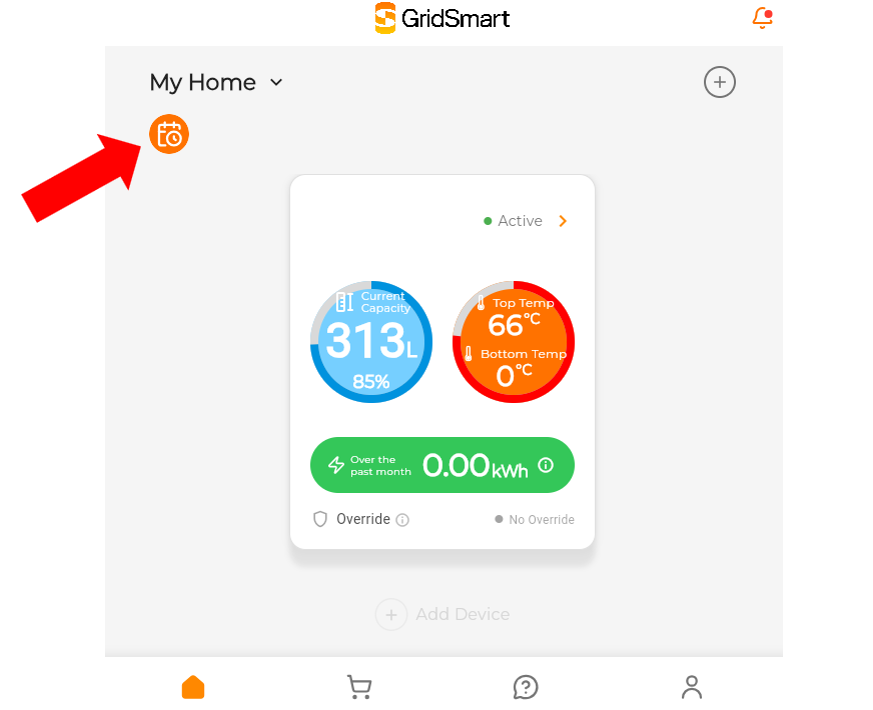
Optimise your cylinder in line with your energy plan by clicking on the schedule icon and select your energy plan.
Each energy plan has two options that either prioritises savings or comfort:
Savings: the AI will optimise your heating in line with your energy pricing, prioritising savings. Generally, this is ideal if you are a low user (1-3 people in a home).
Comfort: if you have a few more people in your home, or have inconsistent usage, this mode might be right for you – you may save less, but hot water delivery is prioritised.
If you have opted for control by your energy retailer, you won’t be able to select a plan.
If you are a Powershop or Ecotricity customer, please pick the region that you are in – visit this page for more detail.
Additional functions
Boost mode: ideal for unexpected high usage – cylinder heats to its maximum allowed temperature and prioritises hot water delivery over savings.
Away mode: Keeps cylinder off for extended periods to save energy.
Cylinder health: this functionality is always on and ensures that your cylinder is running appropriate heating cycles to prevent the growth of legionella
Support
For more information and support, send your questions via the help form or email us at info@gridsmart.co.nz