
You can download the GridSmart app via the Google Play and Apple Store:


Alternatively, you can access the app via your web browser via this www.app.gridsmart.co.nz
Once you have downloaded or accessed the app, you will be asked to sign up or login.
If you do not have an account, click on ‘No account? Create one’ and follow the prompts to create a new account.
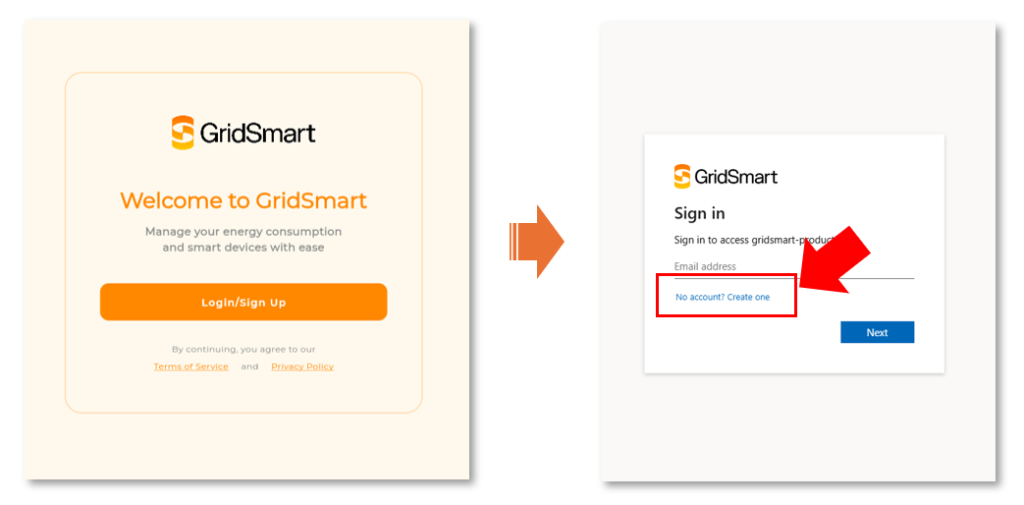
Please note: by creating an account, you agree to our terms and conditions, including our privacy policy.
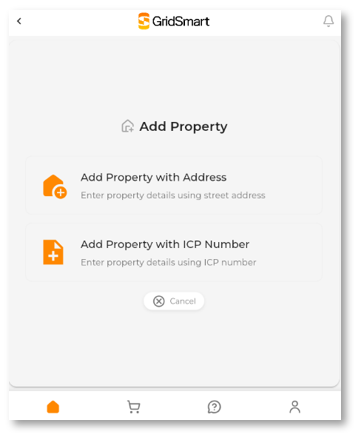
Once your account has been created, you will need to set up a property.
To do this, you will need to either:
Once your property has been set up, it will show any devices that have been installed at your property.
Please note: if you do not have a device installed at your property, you will not be able to set up a property. Contact info@gridsmart.co.nz to get a device installed.
If you are on a time of use plan, you can select your energy plan by clicking this button.
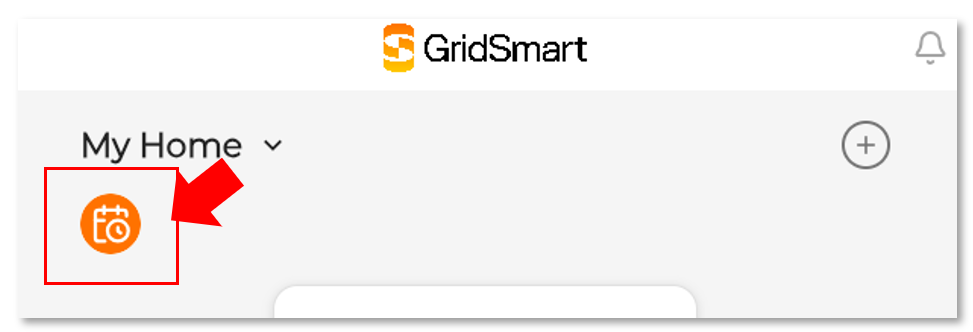
You will be shown a screen with the time of use plans offered by your Energy Retailer.
If you do not see your plan, please contact info@gridsmart.co.nz.
If you have opted to have your Energy Retailer or third party optimise your cylinder for you, this option will be de-activated.
Please note that if you have changed energy retailers recently, it may take a few days for this to be registered with the Electricity Authority and flow through to the GridSmart system.
For more information about the GridSmart app and functionality, download this guide.
Visit FAQ page